Spritesheet GIF Generator: Difference between revisions
From Funkinchan
Jump to navigationJump to search
Created page with "{{Infobox |name = Spritesheet GIF Generator |bodystyle = |titlestyle = background:#99ccff; |abovestyle = background:#99ccff; |subheaderstyle = background:#99ccff; |title = Psych Calculator |above = |subheader = |subheader2 = |imagestyle = |captionstyle = background:#b3d9ff | image = 400px|alt=Example alt text |caption = Spritesheet GIF Generator in use. |heade..." |
No edit summary |
||
| (One intermediate revision by the same user not shown) | |||
| Line 6: | Line 6: | ||
|abovestyle = background:#99ccff; | |abovestyle = background:#99ccff; | ||
|subheaderstyle = background:#99ccff; | |subheaderstyle = background:#99ccff; | ||
|title = | |title = Spritesheet GIF Generator | ||
|above = | |above = | ||
|subheader = | |subheader = | ||
| Line 13: | Line 13: | ||
|imagestyle = | |imagestyle = | ||
|captionstyle = background:#b3d9ff | |captionstyle = background:#b3d9ff | ||
| image = [[File: | | image = [[File:SpritesheetGIFGeneratorV2(Tools).png|400px|alt=Example alt text]] | ||
|caption = Spritesheet GIF Generator in use. | |caption = Spritesheet GIF Generator V2 in use. | ||
|headerstyle = background:#b3d9ff; | |headerstyle = background:#b3d9ff; | ||
| Line 20: | Line 20: | ||
|datastyle = background:#e6f2ff; | |datastyle = background:#e6f2ff; | ||
| label1 = Initial Release | data1 = November 04th, 2025 | | label1 = Initial Release | data1 = | ||
*November 04th, 2025 (V1) | |||
*December 07th, 2025 (V2) | |||
| label2 = Type of Mod | data2 = Other | | label2 = Type of Mod | data2 = Other | ||
| label3 = Credits | data3 = Anonymous | | label3 = Credits | data3 = Anonymous | ||
| Line 34: | Line 35: | ||
Creating GIFs for different poses without the animation files is a complicated process, but this tool helps make it a lot easier. | Creating GIFs for different poses without the animation files is a complicated process, but this tool helps make it a lot easier. | ||
The EXE file is a standalone program that takes the spritesheet and XML you inputted and converts each animation into GIF files. This tool is useful for showcasing sprites and creating wiki pages for mods. | The EXE file is a standalone program that takes the spritesheet and XML you inputted and converts each animation into GIF files. This tool is useful for showcasing sprites and creating wiki pages for mods. | ||
== Gallery == | |||
{{Gallery | |||
| title = | |||
| align = center | |||
| footer = | |||
| style = | |||
| state = | |||
| height = 400px | |||
| width = 400px | |||
| captionstyle = | |||
| File:SpritesheetGIFGenerator(Tools).png | |||
| Spritesheet GIF Generator V1 in use. | |||
}} | |||
== Download Links == | == Download Links == | ||
Latest revision as of 22:36, 7 December 2025
.png) Spritesheet GIF Generator V2 in use. | |
| Initial Release |
|
|---|---|
| Type of Mod | Other |
| Credits | Anonymous |
| Engine | Psych Engine |
| Development Status | Released |
Summary
Creating GIFs for different poses without the animation files is a complicated process, but this tool helps make it a lot easier. The EXE file is a standalone program that takes the spritesheet and XML you inputted and converts each animation into GIF files. This tool is useful for showcasing sprites and creating wiki pages for mods.
Gallery
-
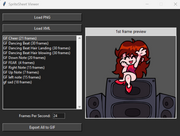 Spritesheet GIF Generator V1 in use.
.png)

